

MKB Punjab Portal Login Problem 2026
Many applicants are facing login problems on the Maryam Ko Batayn Portal in 2026 due to heavy traffic for the Rs. 10,000 Ramadan relief. The mkb.punjab.gov.pk website may show errors like OTP not received, data loading issues, CNIC already registered, or server timeout during peak hours.
Most problems are temporary and caused by overload or incorrect data entry. Users can fix these issues by using incognito mode, clearing cache, updating the app, verifying their SIM registration, or accessing the portal during late-night hours. Registration is free, and approved payments remain secure despite technical delays.
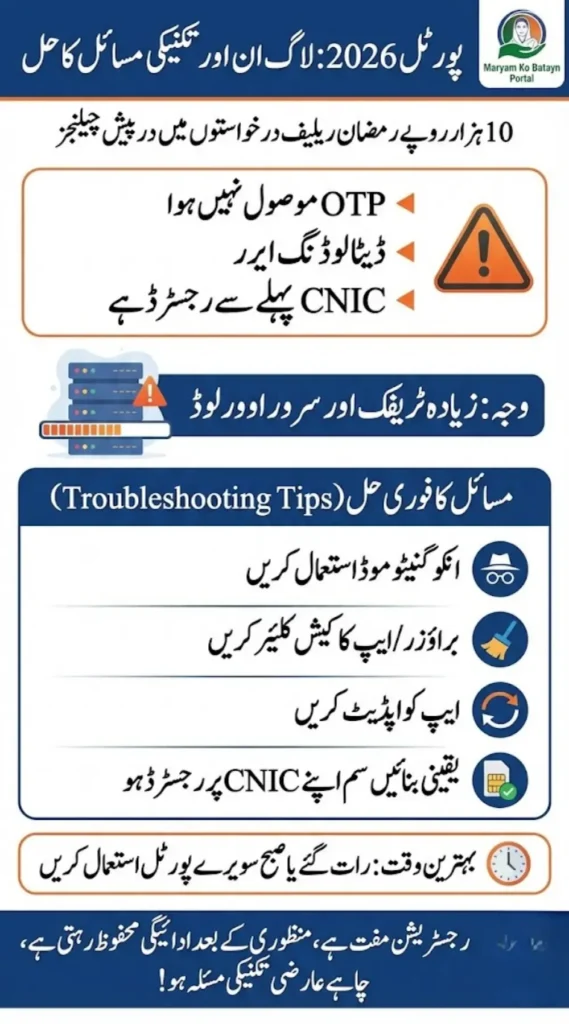
Why Is the MKB Punjab Portal Down?
The main reason is server overload.
Between 10 AM and 6 PM, millions of people log in simultaneously to apply for financial assistance. When traffic spikes, the system may show:
- Connection Timed Out
- Data Loading Error
- White screen
- Login failed
- OTP not received
This does not mean your application is rejected. It simply means the server is under pressure.
Quick Fix Table about MKB Punjab Portal
| Problem | Quick Solution |
|---|---|
| Website not loading | Open in Incognito mode |
| OTP not received | Turn off DND or spam filter |
| CNIC already registered | Use Forgot Password option |
| App crashing | Update from Play Store |
| Data loading error | Clear browser/app cache |
| White screen | Switch to mobile data |
| Invalid mobile number | Use SIM registered on your CNIC |
| Password error | Use 8+ characters with symbol |
Best Time to Access the MKB Punjab Portal
If you want smoother access, timing matters.
- Early morning 2 AM – 5 AM
- Late night after 11 PM
- Avoid peak hours (10 AM – 6 PM)
Many users report successful registration during off-peak hours.
How to Fix OTP Not Received Issue
OTP problems are the most common complaint.
Try these steps:
- Make sure your SIM is active and registered on your CNIC
- Disable SMS blocking or spam protection apps
- Keep minimum balance in your SIM
- Do not press Resend repeatedly — wait 5 to 10 minutes
- Ensure your phone is not in airplane mode
OTPs usually expire within 60 to 120 seconds. Enter them quickly.
Fixing “CNIC Already Registered” Error
Do not create a new account with the same CNIC.
Instead:
- Click Forgot Password
- Enter your registered mobile number
- Reset your password
- If the mobile number is incorrect, call the 1000 helpline
Providing correct information to the support team can resolve account mismatches.
App Not Working? Try These Steps
If you are using the mobile app:
- Free at least 500MB storage on your phone
- Update to the latest version
- Enable SMS and location permissions
- Clear cache from settings
- Uninstall and reinstall if needed
If the app still crashes, use the web portal instead.
Latest 2026 Update
According to official updates, servers have been upgraded to handle higher traffic. A web-based registration option has also been introduced for users facing repeated app crashes.
Payments for approved applicants are being transferred through:
- Bank accounts
- BISP-linked accounts
- JazzCash or EasyPaisa wallets
If you are approved but facing login issues, your payment status remains safe in the system.
Important Safety Reminders
- Registration is completely free
- Do not share CNIC with agents
- Avoid fake social media links
- Always check for official gov.pk domain
- Use only the official portal
Quick Info Table
| Support Option | Details |
|---|---|
| Official Website | mkb.punjab.gov.pk |
| Helpline | 1000 |
| Best Access Method | Web Portal (Late Night) |
| Common Issue | Server overload |
| Registration Fee | Free |
Final Words
Technical problems can be stressful, especially when financial relief is involved. But most login issues on the MKB Punjab Portal are temporary and caused by heavy traffic.
Do not panic. Try off-peak hours, clear your cache, verify your SIM details, and use the official website.
Your Rs. 10,000 Ramadan relief application remains secure in the system. Stay patient and use only verified channels to avoid scams.